Cisco AP342s and AP352s used as Access Points and Repeaters for Home HotSpots and WISPs
and How to Setup the AP342 and AP352 for Optional Encryption and as Repeaters**
by Joe Mehaffey, W2JO  (revision 12/10/03)

I have wanted to compare the operation of Dlink/LinkSys/SMC bridges and APs to some Cisco products for quite awhile. I recently got a BR342, two AP352s and four AP342s to experiment with. You guys have been holding back on me. This Cisco wireless gear is GREAT STUFF for Hotspots,  Wide Area LANs, and use where 802.11b repeaters are needed!  Note:  These units will only act as REPEATERS when the central (root) access point is an AP342/352/1100 or compatible Cisco unit.

I think that anyone thinking about a wide area mesh network should CONSIDER the use of the AP352E2C ($300-100mw) and/or AP342s ($100-30mw) (or later versions such as the AP1100)  models instead of the BR342s or BR352s at nodes. Reasons: a) BR342s only work with other BR342s and clients.  b) BR342s cost about $425 and have fewer features than the AP352s at around $300. And the AP342/AP352 have the same software feature set. c) AP342s and AP352s will interwork and repeat with other AP342s, AP352s, AP1100s, AP1200s, and AP1400s and Cisco says this will continue with the dual channels units coming out.   I also note another dead end device is the BR352 which will only interoperate with other BR352s and clients and not with either BR342s or AP342s/AP352s and upward.   The RFLinx  amps can be used with either model to develop 800mw output (or more with other model amps) if needed for special applications.  One  fact called to my attention is that that BR342/352s while operating as REPEATERS can also provide a data feed out of the ethernet port.  The ethernet port on the AP342/352s is disabled when they are in repeater mode.  Maximum range of the AP units versus the BR units CAN be an issue.  It is reported that max range (from timing considerations) on Cisco's AP models is in excess of 10 miles.  (See below for experimental data gathered in this regard.)  We are checking further and gathering more data to try and discover  the precise maximum range limitation on the AP342/AP352.  Some have suggested that the range of Cisco's AP products is significantly less than the BR products but, so far, we have no authoritative information on this.  PLEASE feel free to email me if you do have such definitive information!)

The mesh networking stuff the Cisco gear does is FANTASTIC! Particularly the new software which has improved self organizing features. (I am running ver 12.04  in six units.)

The AP352 is a really nice companion to the RFLinx  800mw 17db gain amps located 75 to 100 feet away at the tower top.. AP352s start at 100mw (+20dbm) - (75ft LMR400 cable/conn loss=7db) - (pigtail loss=1db) + (amp gain=17db) gives +29dbm which is your 800mw output. Actually RFLinx engineering tells me it will go to +30dbm and that seems reasonable since the amp has a +12vdc PSU and peak voltage at 1 watt output would be only about 10 volts (7vrms). Also, the AP352 has power over the CAT5 ethernet cable so putting it up the tower with the amp is a little easier than with some other models. The adjustable power output on ALL these models is really nice too. And.. If you put the amp right with the access point up the tower, you need the 12db amp and 50mw out of your AP to get your 800mw..

Note: The AP342s and AP352s can operate with  RF coming out either antenna port in diversity mode unless you select just RIGHT or just LEFT. Unfortunately,  this is not as flexible as it seems at first glance.  While you can get RF out of either the left and right port of these units,  the limitation is pretty severe.  The access point receives and transmits using one antenna at a time depending on the signal strength readings, so you cannot increase range by installing high-gain antennas on both connectors and pointing one north and one south. When the access point uses the north-pointing antenna, it would ignore client devices to the south.

Interoperability and compatibility tests were run with the Cisco gear and with various brands of  client cards.  The Cisco units were compatible with 100% of the 802.11b/g cards I tested with.  These included Dlink, SMC, LinkSys, Senao, and Orinoco/Proxim. Some problems I noticed follow. (Tests were not all that scientific but I report it as I saw it.)
1) I was using a Dlink 900AP+ as a central AP on my 100ft tower with an 800mw amplifier. Local links were fine, but three links to stations half a mile away through trees had a high error rate in the area of 20%. It had been that way ever since I put them in and figured this was a result of the dense trees causing multipath distortion.  First I put in a AP-342 in place of the Dlink on the tower. One link going a half mile thru trees to a Senao Card became completely error free. Things improved on the links with the 900AP+ units, but these links still had errors. Then I noticed that the Dlink 900AP+ units on even some shorter test links had a few errors showing over time. I replaced the 900AP+ with the worst error rate with a LinkSys WET11 and immediately, the error rate went to about zero and has stayed there. I then replaced the other two 900AP+ units with WET11s and those links became error free as well.

2) I have one AP352
acting as a repeater installed about 3/4 mile from my tower with an 8db omni antenna  and amplifier. It worked fine from the first moment. I added the 12db amp to get the power up to about 600mw (including cable losses) so as to be able to extend coverage to another repeater and it is all doing a good job.

3) Thruput of three Cisco units in series (AP > repeater1 > repeater2) is still faster than the download speed of a single 1.5mbps ADSL line.

4) Features I like in the Cisco AP342/352 include: a) Each unit keeps records of who is connected and logs traffic, errors, etc. b) AP342/AP352 has transmit power available on both antenna R-TNC antenna ports.  See Note. c) AP342 converts easily to external amp use by inserting a MMCX plug into the internal PCMCIA card and bringing out the cable to an outside connector.  Some AP340 series units have  R-TNC connectors on the rear instead of captive antennas,  but I have not seen any of these for sale on eBay.  d) You can update firmware by radio (and automatically to all units at once if you want). e) EVERYTHING seems to be adjustable/configurable. (This can be a hazard!) For instance, if you check: "Make unit maximum compatible with standard 802.11 devices", the repeat mode and lots of neat features quit working!) f) It is possible to configure the units so that you can SIMULTANEOUSLY serve some clients with encrypted links and others with UNencrypted links. g) These units work with all of the 802.11b/g wireless clients I have tested them with including various SMC, LinkSys, Dlink, Senao, and Orinoco cards and bridge clients. h) The rated temperature range of SOME models is 0 C to 50 C.  While the specification is not quite good enough for outdoor and attic use,  I find that they will operate quite a ways beyond this specification.  One unit has performed flawlessly down to 22F and up to 130F.    More on this later.  i) You can program all features remotely (and securely) by radio. This includes cases where you have multiple signal repeaters.   j) If you have two or more "source" feeds from the internet, the units will self organize.  Load balancing is apparently manual but any section of the "mesh" where the primary feed fails can "home" on another mesh section where AP service is still working.  k) The "associated" table shows "who is connected to whom" including clients,  repeaters and access points.   (I have noticed that client NICs rather than client bridges are what show up in the associated table where you have (say) a WET11 client bridge connected to a NIC card in a client computer. )  l) You can set up the Cisco units to prevent Peer-to-Peer connections on the local wireless LAN if you want. Couple this to "per client" bandwidth throttling (and Kazaa, etc throttling or blocking in a Mikrotik Hotspot) and you can control your gamers and music sharers and keep them from overloading your network. As you can tell, I really am impressed with the features of the Cisco gear and the AP342 is really cost effective at $100 or so on eBay.
---------------------------------------------------------------------------------------------------------------------------------------
How to Setup the APs for Optional Encryption and as Repeaters

First:  A few "gotchas" to keep you from being confused.
1)  Your AP <must> be in AP mode for you to communicate with it over the ethernet cable.  This is the default,  but once you put the unit into "Repeater Access Point" mode you have to communicate with it via the radio channel.  So:  Do not put the unit into REPEATER AP mode until you have made sure you can communicate with it by radio as an AP. 
2) If you plug the unit into your computer's LAN port,  and the unit is then configured as a Root Access point and programmed to revert to "Repeater Access Point" mode when it loses contact with its router over the wirelan,  it WILL disable communications with your computer over the wirelan cable as soon as you enable the "Revert to Repeater Access Point when communications is lost" mode. 
3) Pushing the AP342s reset button for 10 seconds loads the default parameters.  The AP352 has a hole for a reset button,  but the reset button is missing.  There is no way to reset an AP352 to factory defaults without using <:RESETALL> from the hyperterminal command line interface if you lose connectivity for some reason.  I did this a LOT early in my experimentation.
4) Use Hyperterminal and 9600,8,none,1, hardware with a 9 pin serial cable to connect to the APs to discover their IP address initially.  Just turn the unit on with Hyperterminal connected and you will see the IP address (and lots of other stuff) during boot up.  After you have the unit's IP address,  connect a lan crossover cable between the computer and the AP.  Then set your computer's IP address to some other IP address in the same range but different from the AP.  Then load a browser and you should be able to http://<AP unit IP address> and you should be able to connect to the AP setup initial screen.
5) As soon as you get the system up and running and can get to the setup screen,  I recommend you go download the latest production firmware for your units from the Cisco website (above), unzip it into  suitable folders, then go to Cisco Services in the Setup Screen and update the firmware.  Use the BROWSER UPDATE method as it is most straightforward.   Depending on which software comes in your unit,  some of the features below may not appear if you do not have the latest software.
6) If you set up your Root AP and Repeater APs as described below and  with encryption "optional", things work almost exactly as you would expect.  Individual stations can login and get access if they are unencrypted or if they are encrypted and are using the correct encryption codes.  Special Note:  Sometimes when you set an individual station to be encrypted,  that station becomes "invisible" to all other stations on the wireless LAN.  This seems to be related to brand/type of Client Card used.  This "stealthy"  encrypted station a) can no longer be pinged,  b) can no longer be discovered by an IP address scanner, and c) can no longer be accessed by remote control programs such as VNC.   And.. This is independent of if the remote management station is encrypted or not.   This is quite an annoyance.   Please see the table with more test data at the end of this article. If anyone knows a setup arrangement for the AP340/350s that will overcome this limitation, please let me know. 
7) Pick an RF channel for your APs and Repeater APs and do not let them roam the available channels.  (See more below).
8) No.. It is not possible to use the AP342/352s as repeaters AND get a wired LAN signal for local use out of the repeater AP at the same time.  In fact,  these units cannot be used as a standard wired ethernet client bridge ( receiver) at all excepting for the client feature which is really not what these devices were designed for.

Now to the Setup itself
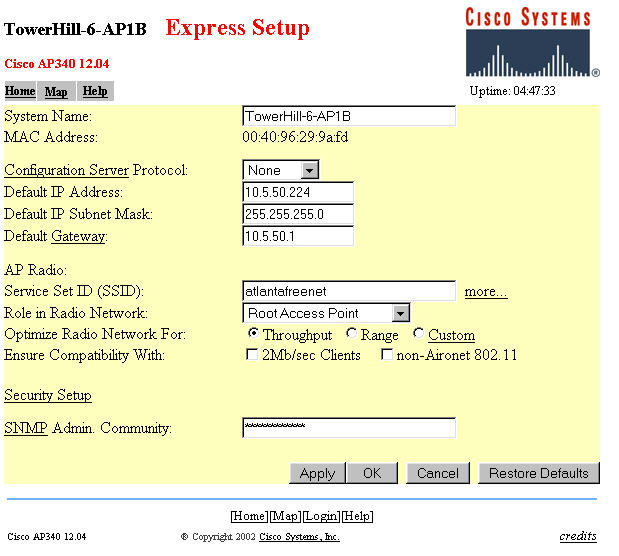
How to set up the Cisco AP 342/352s was somewhat mysterious at first.  There is a pretty inclusive AP342/352 FAQ WEBPAGE and relatively good manual that is downloadable from the Cisco website.  Note the Help link near the upper left of the page (below).  This brings up a help file link from the Cisco website (assuming your AP has internet access).  All this documentation got me started pretty well.  The screen photos below were made with an AP342, but the AP352 setup is almost identical except for the RF power settings.  I was able to get the unit working as an access point by only going to the EXPRESS SETUP page and inputing my IP address, SSID and other information as follows.

There are a couple of things to note about the above: 
1) The System name is arbitrary and should be something meaningful to the system operator.
2) The configuration server protocol options are NONE,  BOOTP, and DHCP.  You use NONE if you want to use a fixed IP address.  You use DHCP if you want the LAN router to pick an IP address for you.  BOOTP I do not know much about.  It makes it a lot easier to administer the AP if you have a fixed IP address that you can easily refer to.
3) The SSID can be whatever you want for your particular installation. 
4) "Role in Radio Network" is a little tricky if you intend to use some units as repeater access points.  Root Access Point means the unit is going to have a wirelan connection and will operate (more or less) as a conventional AP.  Repeater Access Point means the unit is going to NOT have a wirelan connection and will operate as a repeater for other Cisco APs configured as Root Access Points.  Site Survey Client means you can configure the AP for site survey use as a client but it is pretty clumsy at that task.  The tricky part is that EVEN IF you want to use a particular AP as a Repeater Access Point,  you really want to configure it here as a Root Access Point.  The reason is:  a) it allows you to program the same AP functionality into all your APs and b) coming soon (below) is an option that you can set that will direct the Root Access Point to BECOME a Repeater Access Point whenever the wirelan is not present.  By this arrangement,  any Root AP is interchangeable with any repeater AP without any adjustments.
5) For the "Optimize Radio Network For" question,  I recommend as follows:  Range less than 1 mile, use THROUGHPUT.  Range MORE than one mile, use RANGE.  See information on range tests done (near end of paper) for more details.
6)Leave the "Ensure Compatibility With" options unchecked.  If you check these,  many of the neat AP342/352 features (such as repeating and Optional Encryption) will disappear.  (I found this out the hard way.)
7) If you are using SNMP management features, insert your Administration Community ID here.

Another Setup Screen you need to consider is the Ethernet Hardware Setup Screen below:
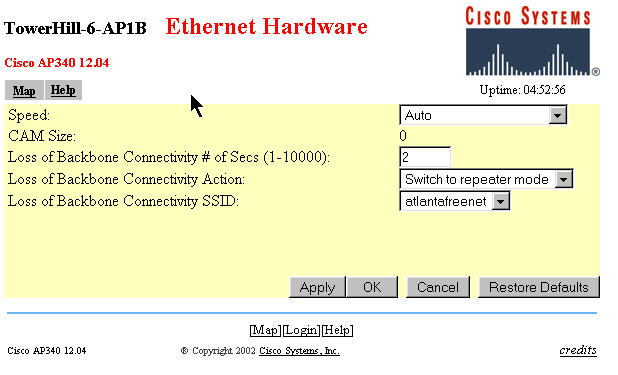
Assuming you have multiple APs and/or some Repeater APs,  set the "Loss of Backbone Connectivity Action" to <Switch to Repeater Mode>
This will cause the AP to operate as a standard Access Point unless/until the AP loses the wirelan connection and then it will switch to Repeater AP mode automatically and associate with a nearby AP and continue serving local clients.  IF your main AP(s) cannot operate as a repeater for a nearby client, you likely will want to select "shut off the radio" option  in case the wirelan link fails.  Otherwise,  the strong radio signal from the failed AP may continue to link to local clients instead of dropping the RF link and allowing local clients to roam to another AP.

Notes:
1) For the best results where you have multiple Root Access Points,  DO NOT leave the Loss of Backbone Connectivity Option set to "No Action" on your Root Access Points.  If you do so, in case of Root AP failure,   repeaters associated with this Root AP will not roam to mesh with the remaining "still alive" APs and repeater APs on your network. 

Below is the "Radio Hardware" setup screen.  There are a few adjustments you MAY want to make.  but you may be happy with the default settings as well.
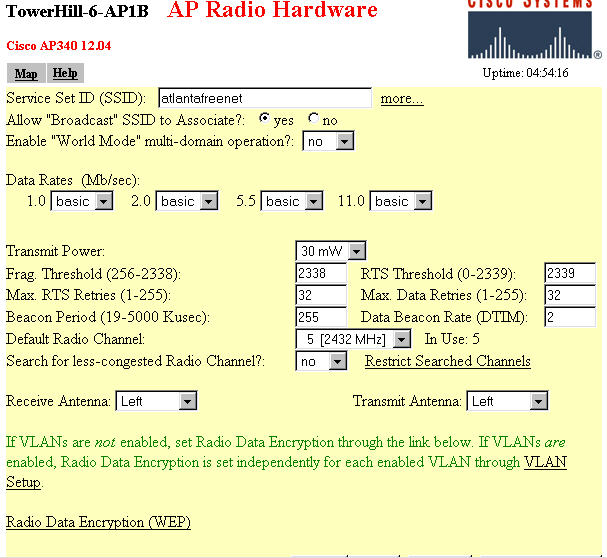

You will have already set the SSID when you arrive at this page if you do the Express Setup.  You DO want the Broadcast SSID to associate and likely you do not want to allow "just any old SSID" to associate which will occur if you set "world mode" to YES.  Note the "more..." link to the right of the SSID window above.  If you want,  you can set up multiple SSIDs for each unit.  This can be used where you want your OWN SSID transmitted (primary) but want the unit to respond to one or more alternative SSIDs as well.  Note that the SSIDs are case sensitive.  In my own area,  I set up my primary SSID as <atlantafreenet.org> and added <ATLANTAFREENET.ORG> as a secondary SSID.  This way I can tell my own hotspot system from the other AtlantaFreeNet.Org systems but my hotspot system will still respond to the "standard" AFN SSID.

The transmit power is adjustable (max 30mw AP342/100mw AP352).  This adjustment can be used to adjust power downward if you have an external amplifier and would be overdriving it with the max power setting.  Be careful about the calculations of drive power required when using amplifiers.  If you put too much drive into an amplifier,  not only will the overdrive create distortion on your signal and  actually REDUCE your range capability,  it can cause severe interference with other users of 802.11 equipment and get you a visit from the FCC!

The Default Radio Channel setting is 6 and with Search for a less-congested radio channel =yes.  I suggest you pick a fixed channel setting for all your APs, turn off search for less-congested channel and stick to it.  I tried allowing the system to "roam" and some of the repeaters would "get lost" and stay on the "default" channel where the Access Points were not available.  I saw no significant thruput degradation from having two Root APs on the same channel.

The RECEIVE and TRANSMIT antenna settings can be set individually for LEFT, RIGHT or DIVERSITY.  If you are using the unit as a normal AP with its built in antennas,  you will likely want to use DIVERSITY for both.  If you are connecting the unit to an external antenna or amplifier,  you will want to select LEFT or RIGHT  depending on which port on the unit you choose to connect to your antenna.  Remember that
the access point receives and transmits using one antenna at a time, so you cannot increase range by installing high-gain antennas on both connectors and pointing one north and one south. When the access point used the north-pointing antenna, it would ignore client devices to the south.

Wireless Encryption Setup

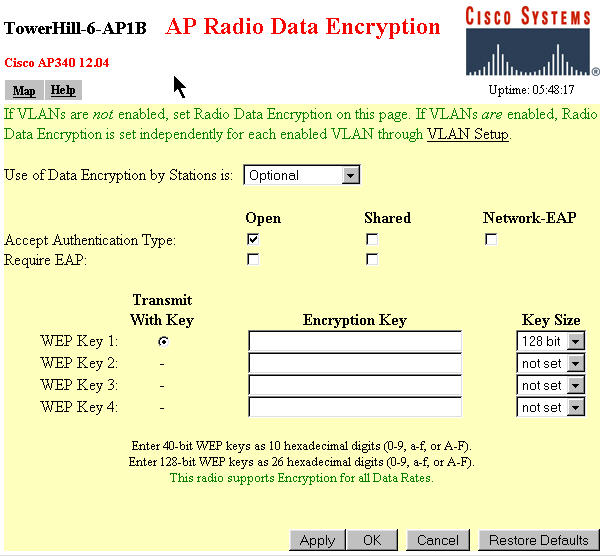
There is a really neat feature in the encryption capabilities of the AP342/AP352 units.  Access Points can be configured to serve both ENCRYPTED and NON-ENCRYPTED clients simultaneously.  This is done with the "Encryption Optional" setting on the WEP setup page below.

Notes:
1) You must put in the WEP key size and then the WEP key before the "Use of Data Encryption by Stations" options will appear.
2) The data encryption options are: a) No Encryption,  b) Optional, and c) Full Encryption.  Optional means that a station logging on with no encryption will be allowed and if a station logs on with the correct key he too will be allowed to associate and the second station's send/receive data will be encrypted using the selected WEP key.
3) Keys must be input as HEX DIGITS.
4) The encryption functions above apply when the AP342/352s are operating in any mode.  When the units are in Repeater Access Mode, some special considerations apply.    If the Repeater AP is set for NO ENCRYPTION,  then all the traffic it passes will be limited to UnEncrypted traffic.  If it is set to Full Encrypted the repeater will only be able to pass encrypted traffic so the associated Root AP must be set to either Optional or Full Encryption for this repeater to operate.  This tidbit confused me for awhile as I had been told that if the Root AP and Repeater AP were set to encrypted,  then all "inter-AP traffic (even unencrypted) was encrypted between the AP and repeater.  This appears not to be true.

I am still figuring out the details about how all this mesh networking gear works.  Helpful Hints,  Corrections,  Suggestions and pure Criticism all accepted in the spirit of "getting it right"!

Thanks
Joe Mehaffey


See Also our article on how to setup a MikroTik HotSpot Router.
See Also the AtlantaFreeNet.Org Website.
And Also our "home base" GPS Information Website

             **Text materials in this paper copyrighted 2003 by Joe Mehaffey,  all rights reserved.  Cisco trademarks belong to Cisco Systems.


TightVNC Remote Control Compatibility tests with various Client and Server radio cards/units

VNC Client is in all cases connecting through one or more AP342s in these tests to a remote VNC Server.
VNC Client  can connect to these Client Units/Cards in systems running VNC Server as shown below. (yes or no)
VNC Client---------------------VNC Server-------------------------VNC Server----------------------------VNC Server
Senao (encrypted)
Senao(not enc) =yes
Linksys Wet11 (not enc)=no
WET11(enc)=yes                    
Senao (NotEnc)
Senao(Not enc)=yes
Linksys Wet11(not enc)=yes
WET11(enc)=no
LucentGold(NotEnc)
Senao(Not enc)=yes
LinksysWet11 (enc)=no
WET11(NotEnc)=yes
WET11 (NotEnc)
Senao(Not enc)=yes
LinksysWet11(NotEnc)=yes
Wet11(enc)=no
WET11(enc)
Senao(Not enc)=yes
LinksysWet11(NotEnc)=yes
Wet11(enc)=yes

If the RECEIVING Senao card is set to encrypted in the tests above,  the receiving Senao card "disappears" from view on the WIRELESS LAN.  It cannot be pinged,  found by an IP scanner nor by the VNC Client machine from any wireless station.  In this situation,  the Senao card DOES have normal connectivity to the internet, to mail servers, and etc.

Anybody Care to explain the table above?  I cannot explain why SOME devices (SENAO) as receivers for the VNC servers will operate with the sender encoded or not, whereas other combinations do not.  In any case,  it seems that the key is that  CONSISTENT results are achieved when both ends of the VNC connection have encryption ON or OFF. EXCEPT for the Senao card which loses connectivity with all but the WIRED LAN when it is set to encrypted and run through the Cisco AP342/352.   My guess is that this is the result of the specialized Cisco protocols used for relaying and other purposes not being 100% compatible with standard 802.11b gear.

What you SEE in the MAC/IP address Displays of Cisco AP342/352s
is not always exactly what you expect.

The association display tables of the Cisco APs does not always display ALL of the connected IPs and MAC addresses alive on the network.  The main discrepancy appears to be when an external wireless client bridge (such as the LinkSys WET11 or the Dlink 900AP+)  is used to provide an ethernet-to-radio bridge for a client computer.  In such an arrangement,  there are possibly THREE sets of MAC addresses and IP addresses to consider.  These are:  a) The MAC address and IP address of the LAN card (NIC) in the client computer,  b) the IP address and  IP address of the ETHERNET side of the client bride device and c) the IP and MAC addresses of the WIRELESS side of the client bridge device.  With this array of addresses to choose from,  here is a table showing what is actually displayed by various devices/software on the Hotspot Network.  Note: In this example, all client bridges (WET11s) and Cisco APs have fixed IP addresses and all client NICs use DHCP.

           
IP displayed
MAC displayed
IP/MAC when Mikrotik Auto MAC Login enabled
Device


Client WinIPCfg
NIC
NIC

Bridge Utility SW
WET11
WET11

Cisco Association
NIC (sometimes WET11 also)
NIC(sometimes WET11 also)

Mikrotik HotSpot Active
NIC (but not if WET11 in circuit)
NIC(but not if WET11 in circuit.)
IP/MAC of autologin via MAC clients not shown
Mikrotik Router DHCP server leased
NIC
NIC
NIC
Mikrotik


Note:  This table data is still being developed.  More details to follow.

 
Experiments to Determine the Maximum Range Capability of the AP342/AP352
            (Firmware in use is Cisco version 12.04)  Maximum Range confirmed greater than 7.45 miles

Experimental Data gathered thus far as to the maximum range of the AP342/AP352 is given below.  These experiments were run with a two watt amplifier on each end of the circuit with a combined antenna gain of 17db for the duration of the tests.  This was done so as to insure to the extent possible that RF level is not the determining factor if data rate slowdowns occur on the link.    There are two configurations to consider.  These are AP optimization set for THRUPUT (TP) and AP optimization set for RANGE (RG).   Note:  I am an Amateur Radio Operator and am able to operate at higher power than normal for part 15 equipment for experimentation on the section of the Part 15 frequency range where Amateur Radio Operators are licensed to operate.  Unless you hold an Amateur Radio License you would be operating outside the Part 15 and FCC  rules to use power levels not provided by your FCC Part 15 approved equipment.

Now to the Measurements
1)  Out to at least 1.5 miles,  the APs will work in TP mode but the speed is down to 2mbps at 1.5 miles with good signals.  Changing the setting to RG mode gets the speed back up to 11mbps at 1.5 miles.  I am sure that there is actually a compromise of the overall data transfer speed,  but it is nice to see the bit rate return to 11mbps when the RG option is selected.  I am not sure where the optimum crossover occurs,  but if you are over about 0.75 mile between a base station and repeater or between repeaters,  you should try the TP and RG options and see which one works best for you based on sustained data thruput.
2) Out at 3.7 miles from the base station (with considerable trees in the way on the mountaintop),  signals were at 42% on the AP342's signal strength display.  On RG option,  the bit rate was 11mbps and the system operated very well indeed.  I changed the settings to the TP option and the speed went to 1mbps and I was (just) barely able to pass enough data to the base station's AP342 to change the option back to RANGE.  So.. I think that something in the range of a mile or a bit less is the place where you should change the AP's option from TP to RG.
3) Out at 7.45 miles from the base station (in the car on local Sawnee Mountain, this time with drizzle and "moderate" tree blockage in the direction of the base station) signals were at 43% to 53% (varying) with the AP342 operating in repeater AP mode  in the back seat of my car.  The signaling rate shown in the car and in the AP342 in the base station stayed at 11 Mbps.   This was very encouraging.  I tried downloading files and everything went along at the max ADSL rate of about 150Kbytes per sec.  Performance looks good now out to at least 7.45 miles with the AP342/AP352 equipment.  I also tested a Senao client card back to the base station direct (without use of the AP342 repeater in the car) and it performed perfectly as expected as well.  These tests were run in the "optimize for RANGE" option both in the base AP and in the repeater AP.  No special selection was made in the Senao PCMCIA card setup.  Transmit power on both ends was set to 2 watts for this test.  Combined antenna gain was about 17db.
4) More distance tests are coming.. Keep tuned.