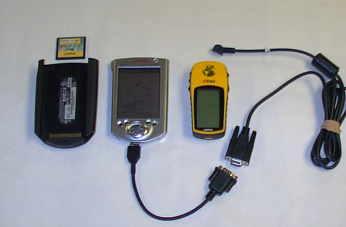
2-3-02 draft draft draft
Recreational Grade GPS - Digital Mapping Software and PDAs - Potential Uses For Incident Management Teams
Introduction
The growing use of reasonably accurate, "feature-rich" recreational-grade Global Positioning Systems (GPS), personal digital assistants ( PDAs) and easy-to-use digital mapping software have created new mapping applications and technologies for use in Incident Management.
Recreational Grade GPS
Magellan introduced the first recreational-grade GPS in 1989. It cost $3000, wasn't very accurate, and had very few features. Today, units range in cost from about $100. to $500. and are both reasonably accurate and usually "feature-rich". Industry sources predict current sales of recreational-grade GPS of $8 billion annually to double in the next three years. Part of the reason for the rise in popularity of recreational-grade GPS has been changes in military-imposed Selective Availability (SA). Prior to May 1, 2000, typical 30-meter accuracy had restricted the use of recreational-grade GPS primarily to hikers, hunters and fisherman who did not demand high accuracy but wanted a low-cost alternative to survey-grade GPS. In May, 2001, SA was removed and GPS accuracy was greatly improved (from 50-100 meters previously to10-20 meters now). Better accuracy can be attained with the addition of a DGPS beacon receiver (2-6 meters), and, with new Wide Area Augmentation System (WAAS)-enabled GPS, three-meter (or better) accuracy is possible. Even greater accuracies (one meter) are possible with specially designed software that can differentially correct recreational-grade GPS (GPS Post Pro and GRINGO software).
Feature-richness In Recreational-Grade GPS
In addition to improved accuracy from features like WAAS, the current generation of recreational-grade GPS have many other useful features such as, moving map screens, routable maps, track profile display, electronic compass, barometric altimeter, calendar, almanac data, and other features often absent in survey-grade GPS units. These units are relatively inexpensive (10-20 per cent the average cost of the cheapest survey-grade equipment). Best of all, recreational-grade GPS units are relatively easy to learn how-to-use.
One feature missing in recreational-grade units has been interface capabilities with data logging equipment (a highly desirable feature found in most survey-grade GPS). Due to inherent differences in signal reception and processing, most recreational-grade GPS data could not be differentially corrected. Finally, there have been problems downloading data from recreational-grade GPS into corporate Geographical Information Systems (GIS) such as ArcView. A number of third party software products have been developed to address these problems. Nearly all PDAs now interface with GPS and can directly or indirectly integrate spatial data with document and spreadsheets applications. With the addition of flash memory, PDAs can handle a vast amount of information. To deal with problems downloading information into corporate GIS, there are now software programs that greatly ease this problem (MapSource 4.06, Waypoint+, AV_Garmin (an ArcView extension).
PDAs
Coincident with the development and improvements in recreational-grade GPS have come efforts to better integrate GPS with PDAs. PDAs will accept a variety of GPS equipment. Several companies offer special GPS units to "sleeve" directly into PDA ports. Software is now available to download digital topographic maps into Palm OS and Pocket PC (formerly Windows CE) devices. Linked to GPS, the PDA screen becomes a moving map that automatically scrolls as the user changes location and allows users to input waypoint, tracklog and routing information. PDAs can also be equipped or integrated to work with a variety of other devices including printers, digital cameras, cell phones, optical scanners and sensors. With wireless service, data can be logged into the PDA and then E-mailed to provide near "real-time" mapping and other incident information.
Digital Topographic Software for PDAs - Examples
MapTech's Pocket Navigator works with MapTech Terrrain Navigator series digital mapping in PocketPCs. Hardware requirements include a minimum 4MB of free memory. Software features include creation and editing of waypoint, tracklog and routes. It has a "find place" feature and GPS functionality. It has an easy-to-use zoom feature and can provide a high resolution color image on the PDA (see figure 2). MapTech topographic mapping software is available for the entire United States. This software costs about $129. for the multi-state series (e.g. Arkansas, Oklahoma and Northeast Texas). MapTech Pocket Navigator costs about $95.
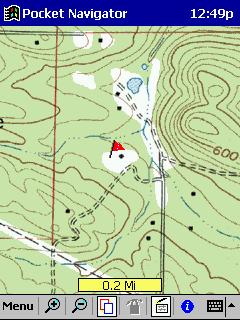
Figure 2 -MapTech's Pocket Navigator Screenshot (Author's Mapping in Casio E-125)
TOPO! Syne USA Software works with National Geographic's TOPO! Digital mapping software in both PalmOS and Pocket PC devices (Figure 3). Map coverage covers 31 states currently. TOPO! Digital maps cost about $89. per state. A separate piece of software TOPO!GPS ($35) is needed for GPS functionality for use with older TOPO! mapping. Newer products include GPS functionality. Topo Sync USA is used to get mapping into a PDA . It cost around $35.
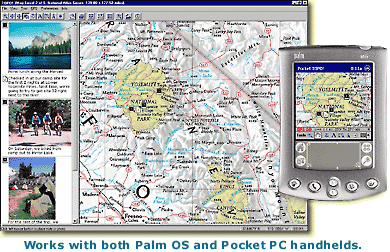
Figure 3 - TOPO! Sync USA Advertisement
Solus Pro 3.0 works in PalmOS formats (Figure 4). Mapping can be downloaded from any of DeLorme's mapping software products including Street Altlas, TopoUSA and 3-D TopoQuads. The software requires a 8MB memory PDA. It features on-screen waypoint creation, distance measurement tool, a routing (directions) tool and GPS functions. It has a zoom feature but doesn't provide as much on-screen flexibility as some other products. DeLorme's map products are available for all the U.S. Solus Pro 3.0 costs $50. DeLorme's PC products vary in cost. TopoUSA cost about $95. but provides coverage of the entire U.S. as a Digital Elevation Model (DEM) product. 3-D TopoQuads are about $89. per state.
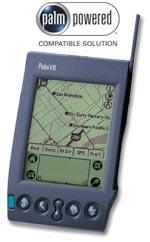
Figure 4 - DeLorme Solus Pro 3.0 Advertisment
OziExplorer is a unique and versatile product that will allow users to calibrate any map image for use in a PocketPC. It has a full suite of waypoint, route and track tools along with full GPS functionality. It has a decided advantage over other products in that it can use .bmp, .tiff, and DRGs, with ease. On the PC version, it has a file menu option to convert tracks and waypoints to ArcView shapefiles. Screen images are full-color with excellent resolution. OziExplorerCE costs about $25. OziExplorer Pro version for the PC costs $75.
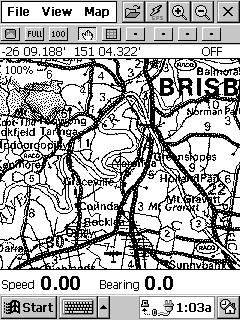
Figure 5 - OziEplorerCE Screenshot Advertisement
Fugawi
Fugawi 3.0 works in PalmOS devices. Like OziExplorer, Fugawi can take virtually any map image and convert it for use in a PDA (Figure 6). It features include a full set of waypoint, tracklog and routing tools with full GPS functionality. It lacks zoom features. Screen resolution is good. It cost about $30.
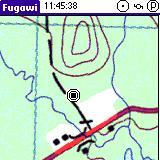
Figure 6 -Fugawi 3.0 Screenshot Advertisement
ESRIs ArcPAd is designed for the "high-end" GIS user (Figures 7). It is relatively expensive ($495.) but has powerful features. It requires a PDA with a minimum 64MB memory.
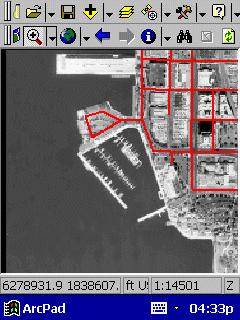
Figure 7 - ArcPad PocketPC Review
Realtime DGPS and Differentially Correcting Recreational-Grade GPS Data
There are ways to improve recreational-grade GPS accuracy. One involves the use of position-averaging. Another method is the use of real-time DGPS via a receiver attached to the GPS device. Another means for better accuracy is to use post-processing software (DeLorme's Post-Pro - cost $99.) with DeLorme's Earthmate and Tripmate GPS receivers (made by Rockwell) to differentially correct data. For Garmin GPS, GRINGO software from England (University of Knottingham - cost 65 UK pounds) can be used to yield differentially corrected data for waypoints. Depending on equipment and methods employed, average accuracy ranging from five to ten meters is typical with two to six-meter accuracy common with either real-time DGPS or WAAS reception. With available software to differentially correct recreational-grade GPS, one-meter or better accuracies are possible (to 10 cm with Gringo software).
Mapping Resolution
The question of GPS accuracy may be moot depending upon the intended use of the information and/or mapping standard. When actually mapped, recreational-grade GPS waypoints and tracklogs may appear visually on a map in the same locations as those derived from more accurate data collected using survey-grade equipment. For example, in typical applications, a pencil-lead width on a USGS 7 1/2 minute topographic map is a 60-foot corridor on the ground. Similarly, a small dot is actually a circle 50 feet in diameter. Hence, at the commonly used scale of 1:24000, there may be no discernible difference in a map location marked using a recreational-grade GPS unit versus the most expensive cadastral-survey grade GPS equipment. This argument may be oversimplified, but the fact remains that much of what initially goes into a corporate GIS database is no more accurate, and indeed often less accurate, than twenty meters.
Getting Garmin Into ArcView
One major problem in using Garmin GPS equipment in Incident Management has been interfacing with corporate GIS, particularly ArcView. There are two methods to process Garmin waypoint and tracklog data. Using Garmin MapSource version 4.06 or newer, choose the export to .txt option; create an Excel spreadsheet to facilitate migrating the text-delimited file into ArcView. The imported data may still need to be re-projected using the ArcView extension projection wizard. Another method involves the use of WayPoint + (the Professional version works best). After downloading GPS information into WayPoint +, use the ArcView extension AV Garmin to complete download process. Data may still need to be re-projected. One of the easiest ways to get Garmin data into ArcView is to download it first into Oziexplorer Professional. This software has a menu choice of exporting into ERSI. Reprojection may still be needed.
Summary
The potential use of recreational-grade GPS units, simple-to-use mapping software and PDAs in Incident Management links new technologies to mapping needs often encountered in emergency situations. With these tools, reasonably accurate geospatial information can quickly be reckoned, mapped and used for strategic and tactical purposes.
References and useful links
http://www.gpsinformation.org/dale/soluspro.htm
http://gpsinformation.net/main/
http://www.gisvisionmag.com/software_reviews/gps.pdf
http://fsweb.sdtdc.wo.fs.fed.us/programs/fm/fy01/gps/gps_cover.html
http://spatialnews.geocomm.com/features/viejasfire/
http://www.microsoft.com/mobile/pocketpc/reviews/arcpad.asp
http://gisstore.esri.com/acb/showdetl.cfm?&DID=6&Product_ID=1601&CATID=112
http://www.nottingham.ac.uk/iessg/gringo/